Pin GitHub Actions to a Commit SHA
by allencharp
Introduction
Supply-chain security usually starts with packages — the poisoned tarball, the base image that was never what its tag claimed. There is a quieter intake path that gets far less attention: the third-party actions referenced by uses: at the top of every workflow.
# .github/workflows/ci.yml
name: CI
on: [push]

jobs:
  build:
    runs-on: ubuntu-latest
    steps:
      - uses: actions/checkout@v4      # someone else's code
      - uses: actions/setup-node@v4
        with:
          node-version: '20'
      - run: npm ci                    # your own command
      - run: npm test
Four steps: two run code you wrote, two fetch and run code someone else wrote. The uses: lines look like pinned versions. They are not — they are mutable pointers, re-resolved on every run, and a typical workflow contains ten to thirty of them, each one executing on your runner with your secrets.
What uses: Actually Does
A step comes in two forms: run: executes a command you wrote, uses: fetches and executes a program someone else wrote.
Reaching a uses: line, the runner asks GitHub what v4 currently points at, downloads that commit, and runs whatever action.yml defines — JavaScript, a container, or a shell entrypoint. Tags resolve at run time, every run.
That code is not sandboxed from your build. It is your build, on a machine holding your source, your GITHUB_TOKEN, and your cloud credentials. Worth asking: of the twenty-odd third-party actions your workflows execute, how many have you read?
Tags Are Pointers, SHAs Are Fingerprints
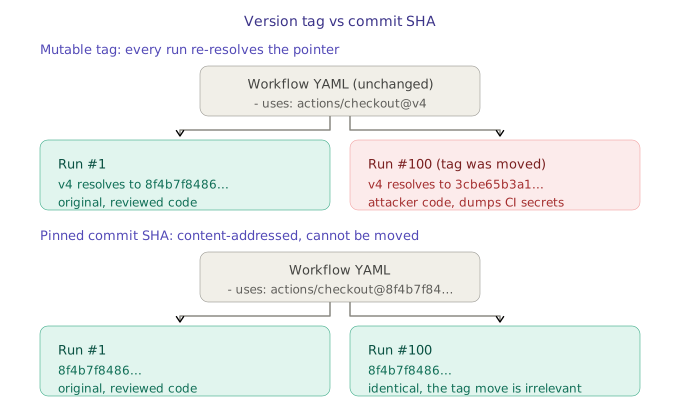
A commit SHA is derived from content — change one byte and the hash is entirely different. It cannot be forged, and it cannot be repointed.
A tag is an alias pointing at one commit. Aliases can be deleted and recreated against a different commit. The name stays v4; the content behind it does not have to.
# what does v4 point at right now?
curl -s https://api.github.com/repos/actions/checkout/commits/v4 | jq -r .sha

# anyone with push access to that repo can do this:
git tag -f v4 <their-commit> && git push -f origin v4
This is the same property that makes app:latest useless as an image identifier. The fix is the same too: reference content, not a name.
The 2023 tj-actions/changed-files Incident
An action used by tens of thousands of repositories was compromised; the attacker moved several version tags to a commit that dumped CI secrets into build logs.
The technique is unremarkable. The observability failure is the lesson:
- Victim repositories changed nothing — no commit, no workflow edit, no dependency bump.
- Logs kept printing
tj-actions/changed-files@v44, so nothing looked different.
Pinning does not stop a maintainer’s account from being compromised. It makes the change impossible to deliver silently — an attacker can move a tag, but cannot make an existing SHA mean something else. New code can only enter through a commit to your workflow, which is a reviewable event.
Pinning
Resolve the specific version, not the rolling major tag:
curl -s https://api.github.com/repos/actions/checkout/commits/v4.1.1 | jq -r .sha
# or: gh api repos/actions/checkout/commits/v4.1.1 --jq .sha
# before
- uses: actions/checkout@v4

# after
- uses: actions/checkout@8f4b7f84864484a7bf31766abe9204da3cbe65b3 # v4.1.1
Keep the version as a trailing comment — the SHA is for the machine, the comment is for whoever reads the diff in six months.
Audit what you already have:
grep -rEn 'uses: [^@]+@(v[0-9]+(\.[0-9]+)*|main|master|latest)[[:space:]]*$' .github/workflows/
Staying Current
Pinning does not mean never updating — it means updates become a pull request instead of a silent background event.
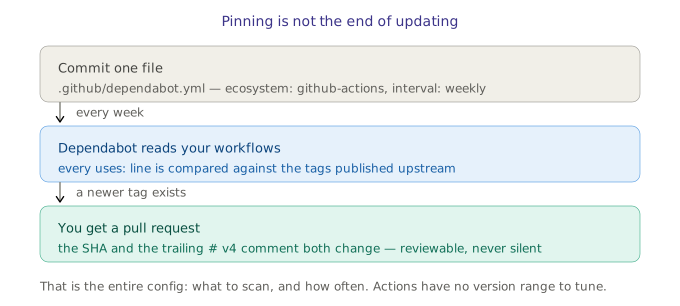
The file that starts this is .github/dependabot.yml — two settings and nothing else: package-ecosystem: "github-actions", directory: "/" (mandatory, unused for actions), and interval: weekly. Dependabot rewrites both the SHA and the comment, and opens a PR titled with the new version.
Beyond Pinning
Pinning stops silent substitution. It does not stop you from voluntarily running a malicious action on day one:
- Organisation allowlist. Settings → Actions → Allow specified actions — restrict to GitHub-authored actions plus an explicit reviewed list. Stronger than pinning; enable it first if your org is small enough to maintain the list.
- Static analysis.
zizmorflags unpinned refs, template injection (${{ github.event.issue.title }}interpolated into arun:block), and excessive token permissions. - Least-privilege tokens. Declare
permissions:explicitly. The defaultGITHUB_TOKENis often write-scoped, which turns any compromised action into a repository-takeover primitive.
Azure DevOps
Azure Pipelines does not use uses:, and the risk model genuinely differs — Marketplace tasks (task: NodeTool@0, task: Docker@2) are installed into the organisation at a fixed version, so an upstream compromise does not silently change what your pipeline runs.
One place has exactly the same weakness — referencing a template repository:
resources:
  repositories:
    - repository: securityTemplates
      type: git
      name: 'Platform/security-templates'
      ref: 'refs/tags/v1.4.0'   # deletable and re-pointable
Pin it to a commit instead:
ref: '8f4b7f84864484a7bf31766abe9204da3cbe65b3'
This matters more than it looks: the extends pattern used to enforce pipeline security baselines depends entirely on that reference resolving to code you actually reviewed.
Checklist
- Every
uses:pinned to a 40-character SHA, version kept as a comment - Dependabot configured for the
github-actionsecosystem - Organisation-level action allowlist enabled
permissions:declared explicitly on every workflow- Azure DevOps template references pinned to a commit, not a tag
zizmoror similar running in CI
A name is a promise, a hash is a fact. Substitute names for hashes wherever the cost of being wrong is someone else’s code running on your infrastructure.
tags: supply-chain-security - github-actions - cicd - devsecops - security-design