ZAP and ZAPv2 Python Library
by allencharp
Setup ZAP
OWASP ZAP (Zed Attack Proxy) is one of the most popular open-source web application security scanners. It works as an intercepting proxy: browsers and scripts are pointed at ZAP, so ZAP can observe and manipulate every request, and it can also launch active/passive scans against targets.
Key concepts:
- Local proxy — ZAP listens on a port (default
8080); all traffic goes through it. - Passive scan — analyzes traffic that already flows through the proxy, without sending new requests.
- Active scan — sends crafted attack payloads to find vulnerabilities.
- Spider — crawls the target to discover URLs.
Setup proxy
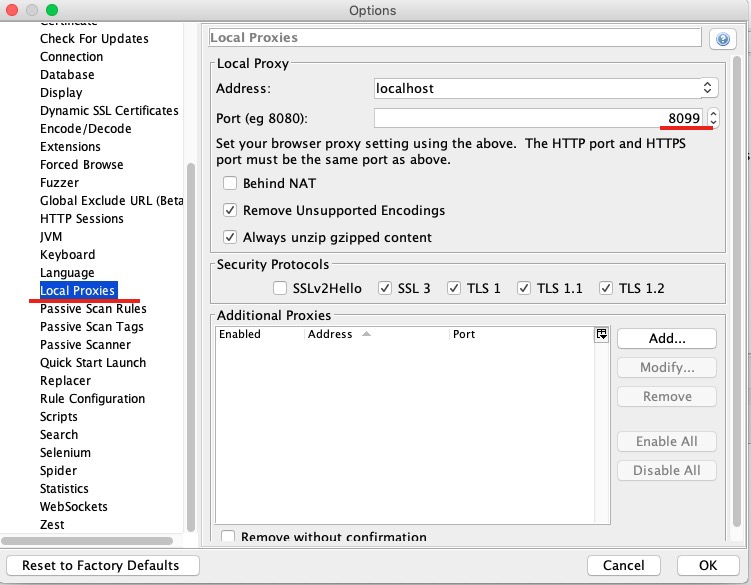
Setup certification
Generate the ZAP certificate from Tools -> Options -> Dynamic SSL Certification, then import the certificate file into the browser. This lets ZAP decrypt HTTPS traffic (MITM with a locally trusted CA).
Browser proxy setup
The browser proxy should be the same as the ZAP proxy (host 127.0.0.1, port 8080), and the ZAP CA certificate must be trusted.
Other common ZAP settings
- Download community scripts from zap-extensions releases, then you can use Python/JavaScript to write your own rules (details will be covered later).
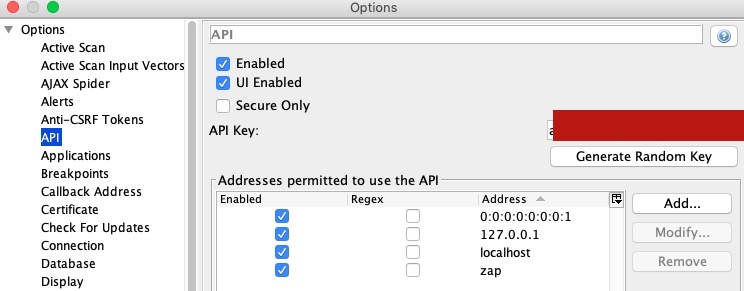
pip install python-owasp-zap-v2.4to install the OWASP ZAP API (ZAPv2 library).- Copy the API Key from Tools -> Options -> API; it will be used in ZAPv2 scripts.
Use the ZAPv2 API
Initialize the ZAPv2 object and set the scan target:
from zapv2 import ZAPv2

target = 'http://127.0.0.1'   # your scan target
apikey = '<your-api-key>'     # replace with the key from Tools -> Options -> API

zap = ZAPv2(apikey=apikey,
            proxies={'http': 'http://127.0.0.1:8090',
                     'https': 'http://127.0.0.1:8090'})

zap.urlopen(target)           # browse the target so ZAP sees it
Common API operations:
zap.spider.scan(target)          # crawl the target
zap.ascan.scan(target)           # start an active scan
zap.pscan.records_to_scan        # passive scan progress
Use Selenium to drive Firefox
Let ZAP listen to the Firefox traffic and scan for vulnerabilities. In this way, login/auth flows can be automated — the crawler can authenticate first and then scan the authenticated surface:
from selenium import webdriver

capabilities = webdriver.DesiredCapabilities.FIREFOX
capabilities['proxy'] = {
    'proxyType': "manual",
    'httpProxy': "127.0.0.1:8080",
    'ftpProxy': "127.0.0.1:8080",
    'sslProxy': "127.0.0.1:8080"
}
capabilities['acceptInsecureCerts'] = True

driver = webdriver.Firefox(capabilities=capabilities)
driver.maximize_window()
For newer Selenium versions, use
selenium.webdriver.FirefoxOptionsandoptions.set_proxy(...)instead of the deprecated capabilities dict.
Run ZAP in Docker
ZAP also ships official Docker images (e.g. owasp/zap2docker-stable), which are handy for CI/CD pipelines. The packaged scripts run a scan and exit with a code your pipeline can gate on:
docker pull owasp/zap2docker-stable
docker run -t owasp/zap2docker-stable zap-baseline.py -t https://example.com
docker run -t owasp/zap2docker-stable zap-full-scan.py -t https://example.com
zap-baseline.py performs a passive scan (safe, no intrusive requests); zap-full-scan.py runs the full active scan.
Summary
ZAP is a swiss-army knife for web app testing: configure proxy + CA once, drive it through the ZAPv2 API or Selenium for authenticated scans, and integrate the Docker images into CI to catch regressions automatically.
tags: pentest - zap - python