ASP.NET Security Feature
by allencharp
Code Best Practices
This post collects practical ASP.NET hardening patterns, from file upload handling to path traversal — each one tied to the vulnerability it prevents.
Secure file upload
1. Stream the file instead of buffering it in memory
Handling a file upload with a streaming approach keeps memory usage flat, which prevents a memory-exhaustion Denial of Service:
using(var stream = file.FileContent)
{
    DoProcessing(stream);
}
The bad approach below uses FileBytes, which reads the whole file content into memory and can lead to a Denial of Service — an attacker only needs to upload many large files:
DoProcessing(file.FileBytes) // Bad approach sample
2. Validate the extension
Restrict uploadable extensions to a small allowlist to prevent malicious file uploads (e.g. .aspx, .asp payloads, or polyglot files that are executable on the server):
<validationsettings allowedfileextensions=".jpg,.png"></validationsettings>
Only an allowlist is safe; a blocklist (
.exe,.php, …) is always incomplete.
Display binary images safely
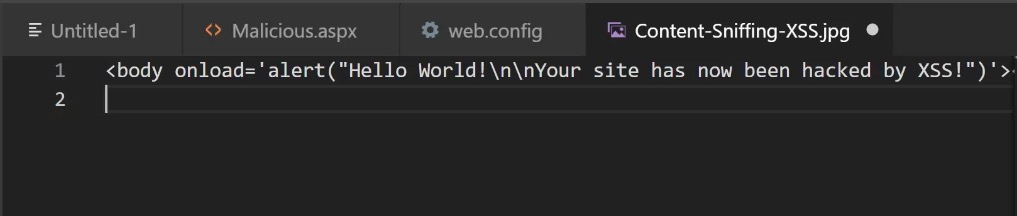
Always specify the ContentType explicitly and add the nosniff directive, so the browser does not sniff the response into HTML and execute a stored XSS payload embedded in an image file:
Response.ContentType = "image/jpeg"; // specify content-type to prevent the vulnerability
Response.Headers.Add("X-Content-Type-Options", "nosniff");
Typically, the JPG XSS attack:
Prevent Open Redirect
An open redirect can be abused for phishing or as part of an OAuth/token-theft chain. Use framework helpers that only allow local redirects:
private IActionResult RedirectToLocal(string returnUrl)
{
    if (Url.IsLocalUrl(returnUrl))
    {
        return Redirect(returnUrl);
    }
    else
    {
        return RedirectToAction(nameof(HomeController.Index), "Home");
    }
}
LocalRedirect is the same protection as a one-liner:
public IActionResult SomeAction(string redirectUrl)
{
    return LocalRedirect(redirectUrl);
}
Enable CSRF token
ASP.NET Core validates anti-forgery tokens automatically when the form/model carries them and the action is decorated:
[ValidateAntiForgeryToken]
[HttpPost]
public IActionResult Update(UpdateModel model) { ... }
Path Manipulation and Path.Combine()
public static byte[] GetFile(String filename) {
  String imageDir = "C:\\Image\\";
  filepath = Path.Combine(imageDir, filename);

  return File.ReadAllBytes(filepath);
}
The security issue in the code above is using Path.Combine() to generate the path string. If the second parameter filename uses an absolute path, the first parameter imageDir is ignored — the attacker can read any file on the system (path traversal).
From MS Doc:
If path2 does not include a root (for example, if path2 does not start with a separator character or a drive specification), the result is a concatenation of the two paths, with an intervening separator character. If path2 includes a root, path2 is returned.
The parameters are not parsed if they have white space. Therefore, if path2 includes white space (for example, “ \file.txt “), the Combine method appends path2 to path1 instead of returning only path2.
Prevention: use Path.GetFileName() to get the “base name” of the parameter — it strips any directory components, so ../../etc/passwd becomes just passwd:
public static byte[] GetFile(String filename) {

  if (string.IsNullOrEmpty(filename) || Path.GetFileName(filename) != filename)
  {
    throw new ArgumentNullException("error");
  }

  String filepath = Path.Combine("\\FILESHARE\images", filename);
  return File.ReadAllBytes(filepath);
}
Security headers
Beyond application logic, set the standard security headers (e.g. via middleware or web.config) to harden the browser side:
Content-Security-Policy— restrict script sources (mitigates XSS impact)X-Frame-Options: DENY(orframe-ancestorsin CSP) — clickjackingStrict-Transport-Security— enforce HTTPS (HSTS)X-Content-Type-Options: nosniff— as shown aboveReferrer-Policy— control referrer leakage
Summary
ASP.NET hardening is a checklist, not a single feature: stream uploads, allowlist extensions, serve images with explicit content type, redirect locally only, validate anti-forgery tokens, sanitize paths before combining, and ship the standard security headers. Each item closes a distinct, well-known attack class.
tags: web-security - aspnet - hardening