OAuth, OIDC and PKCE
by allencharp
When the Answer Is OAuth
Adding OAuth does not settle the problem, it redistributes it — across four roles, each with its own attack surface. The mistake is treating a valid token as the end of the discussion.
The Four Roles
OAuth 2.0 (RFC 6749) is an authorization framework that lets a user grant a third-party application limited access to their resources without sharing credentials. It defines four roles, and nearly every OAuth bug is a confusion about which role owns which responsibility.
The clearest real example is “Sign in to GitHub with Google”. Watch who plays each part:
- Resource Owner — you. You own the identity data in your Google account.
- Authorization Server — Google (
accounts.google.com). It checks your password and 2FA, then mints the tokens. - Resource Server — Google’s userinfo / People API. It holds “who you are” and only returns it when given a valid
access_token. - Client — GitHub. It is the third-party app asking Google for your identity so it can log you in.
The trap to avoid: GitHub is the Client, not the Resource Server. The Resource Server is always the party holding the data the client wants — here, Google. Google actually plays two roles at once: it is both the authorization server (it issues the token) and the resource server (it serves your profile).
Walking through one click on “Sign in with Google”:
- You choose Google on GitHub’s login page.
- GitHub (Client) redirects you to Google (Authorization Server).
- Google authenticates you — password, 2FA, the works.
- Google hands GitHub an
id_token(who you are) plus anaccess_token(the key card). - GitHub presents the
access_tokento Google’s userinfo API (Resource Server) and reads back your email and name. - GitHub now knows who you are and lets you in.
Because this is a login, it is OIDC: that extra id_token is the “name tag” telling GitHub which Google user just signed in — the same split covered later, where OAuth gives you a key card and OIDC also gives an ID card.
OAuth Authorizes, OIDC Authenticates
The shortest correct summary: OAuth is authorization, OIDC is login. But that phrasing hides one nuance worth holding onto — OAuth does authenticate the user. When you sign in, the authorization server checks your password and MFA just the same as it would for a plain login. What OAuth lacks is any standard way to tell the client the result.
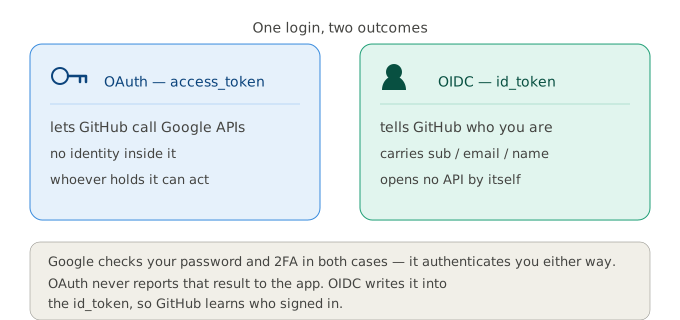
Think of signing in to GitHub with Google. With plain OAuth — GitHub asking to read your Google Drive, say — Google hands GitHub an access_token: GitHub can now call Google’s APIs on your behalf, but the token has no name on it, so it knows it was authorised yet has no standard way to tell who you are. With OIDC — the “Sign in with Google” button — Google hands GitHub that same access_token and an id_token carrying sub, your Google user id, so GitHub finally learns exactly who signed in. Google checks your password and 2FA in both cases; the only difference is whether the outcome of that check is written into a token the app can read.
OIDC is not a replacement for OAuth — it is OAuth with a name tag. Strip the openid scope and the id_token and you are back to plain OAuth; OIDC cannot run without the OAuth flow underneath it. So the question is never “OAuth or OIDC”, it is “do I also need the identity layer?”:
| Situation | OAuth | OIDC |
|---|---|---|
| Act on behalf of a user (call their API) | yes — access_token |
optional |
| The app needs to know who logged in | no | yes — id_token |
| Server-to-server, no user present | yes — client_credentials |
no use |
| Full “log in and call the API” | yes (the base layer) | yes (base + id_token) |
The reason both still matter: the resource server validates the access_token, not the id_token. The id_token is addressed to the client — it tells your app who the user is, but the API does not accept it as proof of permission. So even in a pure OIDC login, every API call is still authorised by the OAuth access_token underneath.
Three Tokens, Three Jobs
- Access token — presented to the resource server to call an API. Its audience is the API.
- ID token — from OIDC, carries claims about the user (email, name) so the client can personalise its UI. Its audience is the client.
- Refresh token — long-lived, exchanged at the authorization server for a new access token without making the user sign in again. Stored server-side, and revocable.
Access tokens are deliberately short-lived, which is what makes the refresh token necessary rather than a convenience.
The consequence: do not authorise API calls with an id_token. It is addressed to the client, not to your resource server, and its aud claim will not contain your API. Authentication happened; authorisation did not.
Pick the Grant First
| Grant | Use it for | Do not |
|---|---|---|
| Authorization code + PKCE | Anything with a user, including web apps | Skip PKCE because you have a secret |
| Client credentials | Server-to-server, no user present | Reuse one credential for every consumer |
| Device authorization | TVs, CLIs, headless hardware | Leave the user code unthrottled |
| Implicit | Nothing — removed in OAuth 2.1 | Tokens leaked via referrer, history, extensions |
| Resource owner password | Legacy migration only — removed in 2.1 | Ship it in a new system |
The Flow and Its Controls
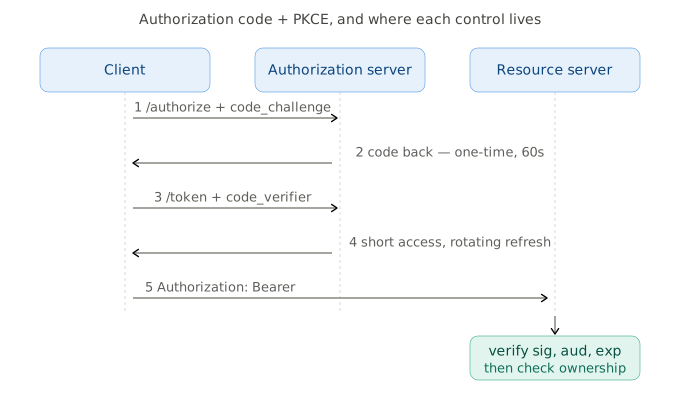
At /authorize: redirect_uri matched exactly — no prefix matching, no wildcards, and no allowlisted path that happens to be an open redirector. state generated randomly, bound to the user’s session, verified on the way back; it defeats authorisation CSRF and code injection. With OIDC, nonce additionally, also session-bound, to stop id_token replay.
The code: one-time, invalidated the moment it is used, and short-lived — OAuth 2.1 caps it at ten minutes, thirty to sixty seconds is normal. Reuse is an attack signal, not a retry.
The tokens: access tokens travel in the Authorization header — never in a query string, which ends up in access logs and Referer. Refresh tokens go only to confidential clients, are stored encrypted server-side, and rotate on every use with reuse detection: a refresh token presented twice means it leaked, and the entire token family gets revoked.
On the client: SPA and native apps are public clients — they cannot hold a secret, so PKCE replaces it. Always launch the system browser (ASWebAuthenticationSession, Chrome Custom Tabs) and never an embedded WebView, which lets the app itself read both the code and the user’s password. In browsers, prefer the BFF pattern: keep tokens server-side and give the browser an HttpOnly + Secure + SameSite session cookie. Tokens in localStorage are one XSS away from gone. On mobile, a claimed HTTPS redirect (RFC 8252 section 7), App Links or Universal Links beat a custom scheme, because the OS verifies domain ownership before routing.
PKCE: Hash the Secret, Publish Only the Hash
PKCE — Proof Key for Code Exchange, RFC 7636 — is the control that makes the authorization code flow safe for public clients: native apps and SPAs that ship their client_id to every device and cannot keep a client_secret. Because the token endpoint cannot authenticate such a client, the only thing standing between a stolen code and a fresh token is proof that the code’s original sender is the one redeeming it. PKCE supplies that proof.
The idea is small — hide a secret before asking, present it when collecting:
code_verifier  = BASE64URL(32 random bytes)      # 43-128 chars, [A-Za-z0-9-._~]
code_challenge = BASE64URL(SHA256(ASCII(code_verifier)))
- The client generates a fresh high-entropy
code_verifierbefore redirecting and keeps it in memory. - Only the hash goes to
/authorize, ascode_challengewithcode_challenge_method=S256. - The authorization server stores that challenge bound to the code record — not in a cookie, not in a session.
- At
/tokenthe client sends the plaintextcode_verifier; the server re-hashes it and compares.
An attacker who intercepts the code still cannot redeem it: the challenge that travelled in the URL is a one-way hash, and the verifier that would satisfy it never crossed the redirect. PKCE does not stop interception — it makes the stolen code worthless.
Two rules that get broken:
- Never accept
plain. Withplain, the challenge is the verifier, and the challenge travels in a browser URL. Hashing is what makes the challenge safe to publish. - Enforce, do not default. An attacker can strip
code_challengefrom the authorize request entirely. If the client is public, require PKCE; if a challenge was sent, require the verifier.
What the Resource Server Must Check
Receiving a JWT is not the same as trusting it. Every one of these is a real bypass when missed:
| Check | What goes wrong without it |
|---|---|
alg pinned server-side |
none, or RS256/HS256 confusion using the public key as an HMAC secret |
| Signature verified | Anyone can mint a token |
iss |
A token from a different tenant’s IdP is accepted |
aud contains this service |
A token minted for API-A is replayed against API-B |
exp / nbf / iat |
Tokens valid forever; allow a small clock skew |
kid resolved from a fixed whitelist |
jku / x5u headers point the verifier at the attacker’s key set |
jti on critical operations |
Payment or password-change requests replay |
| A revocation path | No way to kick a session before expiry |
Two things that are not on the list and belong in your head anyway: the payload is base64, not encryption — anything confidential needs JWE — and a valid token does not authorise the request. After all eight checks you know who is calling. Whether they may read this row is still layer three from the API defence layers, and OAuth does not do it for you.
tags: web-security - oauth - oidc - pkce - jwt - authentication